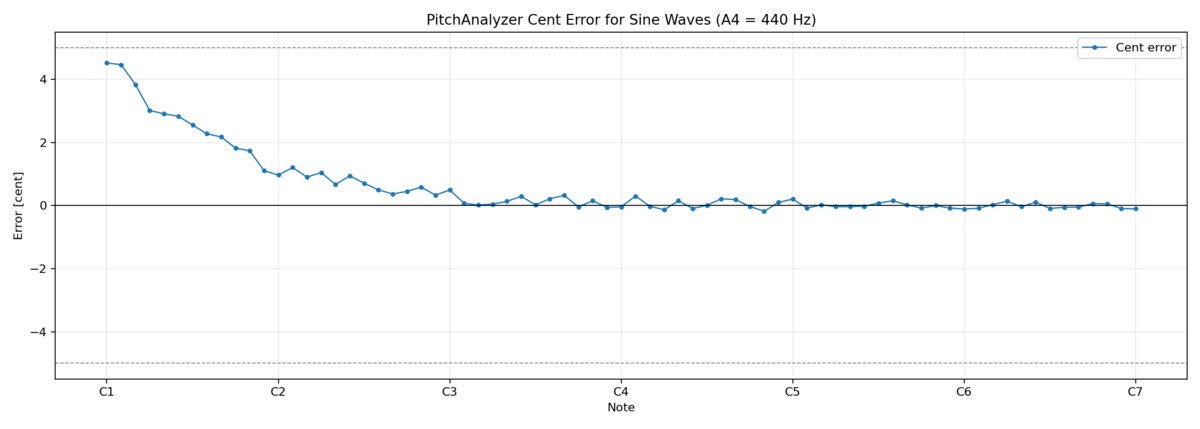
実装
以下のようなスクリプトを作成した。
sleepなしだと頻繁にKontakt5が異常終了するため、長めのsleepを入れている。
打楽器系やアルペジエイター、コード系、シンセ、パッドは除外している。
from __future__ import annotations

import argparse
import csv
import re
import threading
import time
from dataclasses import dataclass
from pathlib import Path
from typing import Any

import numpy as np
from pitch_analyzer import midi_to_note_name

try:
    import dawdreamer as daw
except ImportError:
    daw = None

try:
    import pyautogui as pag
    import pygetwindow as gw
    import pyperclip
except ImportError:
    pag = None
    gw = None
    pyperclip = None

try:
    import soundfile as sf
except ImportError:
    sf = None

DEFAULT_KONTAKT_DLL = r"C:\Program Files\Native Instruments\VSTPlugins 64 bit\Kontakt 5.dll"
DEFAULT_NKI_ROOT = r"W:\Native Instruments"
DEFAULT_WINDOW_TITLE = "DawDreamer: Kontakt 5"

PURPLE_KEY_COLOR = (170, 163, 218)
BLUE_KEY_COLOR = (129, 199, 218)
DEFAULT_EXCLUDE_KEYWORDS = ["West Africa Library", "Timpani", "Drum", "Cymbals", "Percussion", "Beats", "Noise", "Chords", "Arpeggiator", "Sequencer", "Perc", "Toys", "Pitchmod", "Blub", "FX Collection", "Wah", "(tremolo", "(fortepiano", "(pizzicato", "(sforzando", "(stac", "(legato", "(all"]
INVALID_PATH_CHARS_RE = re.compile(r'[<>:"/\\|?*]')


@dataclass
class EditorAutomationResult:
    success: bool = False
    error_message: str | None = None
    allowed_notes: list[int] | None = None


def sanitize_path_component(name: str) -> str:
    sanitized = INVALID_PATH_CHARS_RE.sub("_", name).strip().rstrip(".")
    return sanitized if sanitized else "unnamed"


def audio_to_sf_layout(audio: np.ndarray) -> np.ndarray:
    arr = np.asarray(audio, dtype=np.float32)
    if arr.ndim == 1:
        if arr.size == 0:
            raise RuntimeError("Rendered audio is empty.")
        return arr
    if arr.ndim != 2:
        raise RuntimeError(f"Unexpected rendered audio shape: {arr.shape}")

    # Normalize to soundfile layout: (samples, channels).
    # DawDreamer commonly returns (channels, samples).
    if arr.shape[0] <= arr.shape[1]:
        data = arr.T
    else:
        data = arr

    if data.shape[0] <= 0 or data.shape[1] <= 0:
        raise RuntimeError(f"Rendered audio is empty: {arr.shape}")

    # Some plugins return many output buses (e.g. 64ch). Save only L/R.
    if data.shape[1] >= 2:
        data = data[:, :2]

    return np.ascontiguousarray(data, dtype=np.float32)


def wait_for_window(title_keyword: str, timeout: float = 30.0, interval: float = 0.2) -> Any | None:
    start = time.time()
    while time.time() - start <= timeout:
        wins = gw.getWindowsWithTitle(title_keyword)
        if wins:
            return wins[0]
        time.sleep(interval)
    return None


def color_matches(target_color: tuple[int, int, int], candidate_color: tuple[int, int, int], tolerance: int) -> bool:
    return (
        abs(int(target_color[0]) - int(candidate_color[0])) <= tolerance
        and abs(int(target_color[1]) - int(candidate_color[1])) <= tolerance
        and abs(int(target_color[2]) - int(candidate_color[2])) <= tolerance
    )


def get_midi_note_color(win: Any, note: int) -> tuple[int, int, int]:
    rel_x = 587 + (note - 24) * 554 / 84
    if note % 12 in (1, 3, 6, 8, 10):
        rel_x -= 4
    rel_y = 843
    return pag.pixel(win.left + int(rel_x), win.top + int(rel_y))


def wait_load_nki(win: Any, timeout: float = 60.0, interval: float = 0.2) -> None:
    start = time.time()
    while time.time() - start <= timeout:
        close_button_color = pag.pixel(win.left + 1138, win.top + 174)
        if int(close_button_color[0]) >= 200:
            return
        time.sleep(interval)
    raise TimeoutError("Timed out while waiting for Kontakt instrument load.")


def collect_allowed_notes(
    win: Any,
    midi_min: int,
    midi_max: int,
    color_tolerance: int,
) -> list[int]:
    allowed_notes: list[int] = []
    for note in range(midi_min, midi_max + 1):
        color = get_midi_note_color(win, note)
        if color_matches(PURPLE_KEY_COLOR, color, color_tolerance) or color_matches(BLUE_KEY_COLOR, color, color_tolerance):
            allowed_notes.append(note)
    return allowed_notes


def automate_load_nki(
    nki_path: Path,
    window_title: str,
    midi_min: int,
    midi_max: int,
    color_tolerance: int,
    result: EditorAutomationResult,
) -> None:
    try:
        pag.FAILSAFE = False
        pag.PAUSE = 0.05

        win = wait_for_window(window_title, timeout=10.0, interval=0.2)
        if win is None:
            win = wait_for_window("Kontakt 5", timeout=10.0, interval=0.2)
        if win is None:
            raise RuntimeError(f"Kontakt window not found: title_keyword={window_title!r}")

        win.activate()
        time.sleep(1)

        pag.click(win.left + 1138, win.top + 174)
        time.sleep(3)
        pag.click(win.left + 850, win.top + 56)
        time.sleep(0.5)
        pag.click(win.left + 909, win.top + 122)

        load_win = wait_for_window("Load Patch", timeout=10.0, interval=0.2)
        if load_win is None:
            raise RuntimeError("Load Patch dialog was not found.")
        load_win.activate()
        time.sleep(0.5)

        pyperclip.copy(str(nki_path))
        pag.hotkey("ctrl", "v")
        pag.press("enter")

        wait_load_nki(win, timeout=90.0, interval=0.2)
        time.sleep(10)
        allowed_notes = collect_allowed_notes(win, midi_min, midi_max, color_tolerance)

        result.allowed_notes = allowed_notes
        result.success = True
    except Exception as exc:
        result.error_message = str(exc)
    finally:
        try:
            w = wait_for_window(window_title, timeout=1.0, interval=0.1)
            if w is None:
                w = wait_for_window("Kontakt 5", timeout=1.0, interval=0.1)
            if w is not None:
                w.close()
        except Exception:
            pass


def load_patch_and_collect_notes(
    kontakt: Any,
    nki_path: Path,
    window_title: str,
    midi_min: int,
    midi_max: int,
    color_tolerance: int,
) -> list[int]:
    result = EditorAutomationResult()
    worker = threading.Thread(
        target=automate_load_nki,
        args=(nki_path, window_title, midi_min, midi_max, color_tolerance, result),
        daemon=True,
    )
    worker.start()
    kontakt.open_editor()
    worker.join()

    if not result.success:
        raise RuntimeError(f"Failed to load NKI by UI automation: {nki_path} ({result.error_message})")
    return result.allowed_notes or []


def enumerate_nki_files(root: Path, exclude_keywords: list[str]) -> list[Path]:
    if not root.exists():
        raise FileNotFoundError(f"NKI root directory not found: {root}")

    lowered_keywords = [k.lower() for k in exclude_keywords]
    nki_paths: list[Path] = []
    for path in root.rglob("*.nki"):
        lower_path = str(path).lower()
        if any(keyword in lower_path for keyword in lowered_keywords):
            continue
        nki_paths.append(path)
    nki_paths.sort()
    return nki_paths


def build_patch_output_dir(output_root: Path, nki_root: Path, nki_path: Path) -> Path:
    relative_no_ext = nki_path.relative_to(nki_root).with_suffix("")
    sanitized_parts = [sanitize_path_component(part) for part in relative_no_ext.parts]
    return output_root.joinpath(*sanitized_parts)


def has_existing_wav(patch_output_dir: Path) -> bool:
    if not patch_output_dir.exists():
        return False
    return any(p.is_file() and p.suffix.lower() == ".wav" for p in patch_output_dir.iterdir())


def merge_patch_csvs(
    output_root: Path,
    nki_root: Path,
    nki_files: list[Path],
    patch_csv_name: str,
    merged_csv_path: Path,
) -> tuple[int, int]:
    merged_csv_path.parent.mkdir(parents=True, exist_ok=True)
    merged_count = 0
    merged_rows = 0

    with merged_csv_path.open("w", newline="", encoding="utf-8") as out_f:
        writer = csv.DictWriter(out_f, fieldnames=["path", "note"])
        writer.writeheader()

        for nki_path in nki_files:
            patch_output_dir = build_patch_output_dir(output_root, nki_root, nki_path)
            patch_csv_path = patch_output_dir / patch_csv_name
            if not patch_csv_path.exists():
                continue

            with patch_csv_path.open("r", newline="", encoding="utf-8") as in_f:
                reader = csv.DictReader(in_f)
                if reader.fieldnames is None:
                    continue
                if "path" not in reader.fieldnames or "note" not in reader.fieldnames:
                    continue

                row_count_this_file = 0
                for row in reader:
                    writer.writerow(
                        {
                            "path": str(row.get("path", "")),
                            "note": str(row.get("note", "")),
                        }
                    )
                    merged_rows += 1
                    row_count_this_file += 1

                if row_count_this_file > 0:
                    merged_count += 1

    return merged_count, merged_rows


def render_and_save_note(
    kontakt: Any,
    engine: Any,
    midi_note: int,
    velocity: int,
    lead_in: float,
    note_duration: float,
    tail_sec: float,
    sample_rate: int,
    output_wav_path: Path,
) -> None:
    kontakt.clear_midi()
    kontakt.add_midi_note(int(midi_note), int(velocity), float(lead_in), float(note_duration))

    render_sec = max(float(lead_in) + float(note_duration) + float(tail_sec), float(lead_in) + float(tail_sec))
    engine.render(render_sec)
    audio = engine.get_audio()

    audio_for_sf = audio_to_sf_layout(np.asarray(audio, dtype=np.float32))
    output_wav_path.parent.mkdir(parents=True, exist_ok=True)
    sf.write(
        str(output_wav_path),
        audio_for_sf,
        int(sample_rate),
        format="WAV",
        subtype="PCM_16",
    )


def parse_args() -> argparse.Namespace:
    parser = argparse.ArgumentParser(
        description="Render Kontakt5 .nki patches and save each note as an individual WAV file."
    )
    parser.add_argument("--output-dir", type=Path, required=True, help="Output root directory for rendered wav files.")
    parser.add_argument("--patch-csv-name", type=str, default="notes.csv", help="CSV filename saved in each patch folder.")
    parser.add_argument(
        "--merged-csv",
        type=Path,
        default=None,
        help="Merged CSV path for all patch CSV files. If omitted, <output-dir>/all_notes.csv is used.",
    )
    parser.add_argument("--kontakt-dll", type=Path, default=Path(DEFAULT_KONTAKT_DLL), help="Kontakt 5 VST dll path.")
    parser.add_argument("--nki-root", type=Path, default=Path(DEFAULT_NKI_ROOT), help="Root folder to search *.nki.")
    parser.add_argument("--window-title", type=str, default=DEFAULT_WINDOW_TITLE, help="Kontakt editor window title keyword.")
    parser.add_argument(
        "--exclude-keywords",
        nargs="*",
        default=DEFAULT_EXCLUDE_KEYWORDS,
        help="Exclude .nki paths containing these keywords.",
    )
    parser.add_argument("--sample-rate", type=int, default=48000, help="Render sample rate.")
    parser.add_argument("--buffer-size", type=int, default=256, help="Render buffer size.")
    parser.add_argument("--bpm", type=float, default=120.0, help="Render BPM.")
    parser.add_argument("--velocity", type=int, default=100, help="MIDI note velocity.")
    parser.add_argument("--midi-min", type=int, default=24, help="Minimum MIDI note to use (inclusive).")
    parser.add_argument("--midi-max", type=int, default=108, help="Maximum MIDI note to use (inclusive).")
    parser.add_argument("--note-duration", type=float, default=3.0, help="MIDI note duration per note (sec).")
    parser.add_argument("--lead-in", type=float, default=0.1, help="Render lead-in before note-on (sec).")
    parser.add_argument("--tail-sec", type=float, default=1.0, help="Render tail after note-off (sec).")
    parser.add_argument("--max-files", type=int, default=None, help="Optional max number of .nki files to process.")
    parser.add_argument(
        "--color-tolerance",
        type=int,
        default=12,
        help="RGB per-channel tolerance for purple/blue key color matching.",
    )
    return parser.parse_args()


def main() -> None:
    args = parse_args()

    if daw is None:
        raise RuntimeError("dawdreamer is not installed.")
    if pag is None or gw is None or pyperclip is None:
        raise RuntimeError("pyautogui, pygetwindow, pyperclip are required for Kontakt UI automation.")
    if sf is None:
        raise RuntimeError("soundfile is not installed.")
    if args.note_duration <= 0.0:
        raise ValueError("--note-duration must be > 0.")
    if args.sample_rate <= 0:
        raise ValueError("--sample-rate must be > 0.")
    if args.buffer_size <= 0:
        raise ValueError("--buffer-size must be > 0.")
    if args.midi_min < 24 or args.midi_max > 108 or args.midi_min > args.midi_max:
        raise ValueError("MIDI note range must be within 24-108 and midi-min <= midi-max.")
    if args.patch_csv_name.strip() == "":
        raise ValueError("--patch-csv-name must not be empty.")
    if "/" in args.patch_csv_name or "\\" in args.patch_csv_name:
        raise ValueError("--patch-csv-name must be a file name, not a path.")

    nki_files = enumerate_nki_files(args.nki_root, args.exclude_keywords)
    if args.max_files is not None:
        nki_files = nki_files[: max(args.max_files, 0)]
    if not nki_files:
        raise RuntimeError("No .nki files found after filtering.")

    args.output_dir.mkdir(parents=True, exist_ok=True)

    engine = daw.RenderEngine(int(args.sample_rate), int(args.buffer_size))
    engine.set_bpm(float(args.bpm))
    kontakt = engine.make_plugin_processor("Kontakt5", str(args.kontakt_dll))

    patches_processed = 0
    patches_skipped_existing = 0
    notes_saved_total = 0
    notes_candidate_total = 0

    for index, nki_path in enumerate(nki_files, start=1):
        patch_output_dir = build_patch_output_dir(args.output_dir, args.nki_root, nki_path)
        patch_csv_path = patch_output_dir / args.patch_csv_name

        if has_existing_wav(patch_output_dir):
            patches_skipped_existing += 1
            print(f"[{index}/{len(nki_files)}] skipped (existing wav): {nki_path} -> {patch_output_dir}")
            continue

        print(f"[{index}/{len(nki_files)}] Loading patch: {nki_path}")

        allowed_notes = load_patch_and_collect_notes(
            kontakt=kontakt,
            nki_path=nki_path,
            window_title=args.window_title,
            midi_min=args.midi_min,
            midi_max=args.midi_max,
            color_tolerance=args.color_tolerance,
        )
        engine.load_graph([(kontakt, [])])
        allowed_notes = [n for n in allowed_notes if args.midi_min <= n <= args.midi_max]
        notes_candidate_total += len(allowed_notes)

        if not allowed_notes:
            print("  skipped: no allowed keys (purple/blue) in MIDI range.")
            continue

        patch_output_dir.mkdir(parents=True, exist_ok=True)
        csv_exists = patch_csv_path.exists()

        total_notes_in_patch = len(allowed_notes)
        notes_saved_patch = 0
        with patch_csv_path.open("a", newline="", encoding="utf-8") as f:
            writer = csv.DictWriter(f, fieldnames=["path", "note"])
            if not csv_exists or patch_csv_path.stat().st_size == 0:
                writer.writeheader()

            for note_index, midi_note in enumerate(allowed_notes, start=1):
                note_wav_name = f"note_{int(midi_note):03d}.wav"
                note_wav_path = patch_output_dir / note_wav_name
                rel_path = note_wav_path.relative_to(args.output_dir).as_posix()
                csv_path = (args.output_dir / rel_path).as_posix()
                note_name = midi_to_note_name(int(midi_note))
                print(f"  note [{note_index}/{total_notes_in_patch}] midi={midi_note}: rendering -> {note_wav_path}")

                try:
                    render_and_save_note(
                        kontakt=kontakt,
                        engine=engine,
                        midi_note=int(midi_note),
                        velocity=int(args.velocity),
                        lead_in=float(args.lead_in),
                        note_duration=float(args.note_duration),
                        tail_sec=float(args.tail_sec),
                        sample_rate=int(args.sample_rate),
                        output_wav_path=note_wav_path,
                    )
                    writer.writerow({"path": csv_path, "note": note_name})
                    f.flush()
                    notes_saved_patch += 1
                    notes_saved_total += 1
                    print(f"    done: {csv_path}, note={note_name}")
                except Exception as exc:
                    writer.writerow({"path": csv_path, "note": ""})
                    f.flush()
                    print(f"    failed: {csv_path}: {exc}")

        patches_processed += 1
        print(f"  saved: {notes_saved_patch} files, csv={patch_csv_path}")

    merged_csv_path = args.merged_csv if args.merged_csv is not None else (args.output_dir / "all_notes.csv")
    merged_count, merged_rows = merge_patch_csvs(
        output_root=args.output_dir,
        nki_root=args.nki_root,
        nki_files=nki_files,
        patch_csv_name=args.patch_csv_name,
        merged_csv_path=merged_csv_path,
    )

    print(f"Output directory: {args.output_dir}")
    print(f"Merged CSV: {merged_csv_path}")
    print(f"Merged patch CSV files: {merged_count}")
    print(f"Merged rows: {merged_rows}")
    print(f"Processed NKI files: {patches_processed}/{len(nki_files)}")
    print(f"Skipped existing patches: {patches_skipped_existing}")
    print(f"Candidate notes: {notes_candidate_total}")
    print(f"Saved note WAV files: {notes_saved_total}")


if __name__ == "__main__":
    main()